


AI Redesign - Home Design
3.721.00 Reviews
App Specs
- Version
- 2.0.4
- Updated On
- License
- Free
- Downloads
- 100,000+
- Developer
- Tasmanic Editions
- Categories
- House & Home
- Platform
- Android
Screenshots
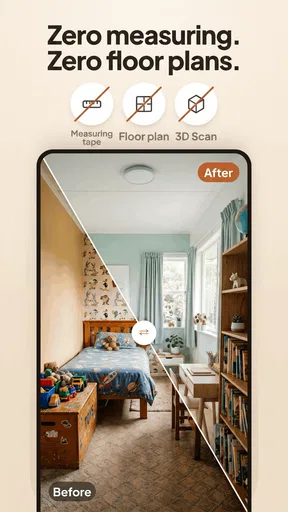
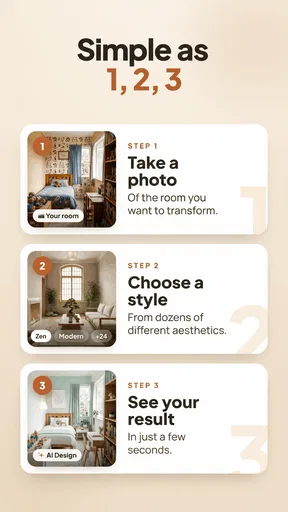

 Analysis by AppCompare
When I start planning a room refresh, the hardest part is often picturing how a new look will feel in the space I already have. That is the problem AI Redesign - Home Design aims to make easier: it turns a room photo into a starting point for home-design ideas. I see it as a visual brainstorming tool, not a substitute for measuring, budgeting, or deciding what will work in daily life.
What the app can—and cannot—help you judge
I use the app’s room-image approach to explore visual direction, but I would not treat a generated scene as proof that a layout or renovation will work. The distinction is useful when deciding whether the app suits a casual refresh or a more technical project. Next, I look at the choices a user can sensibly make before sharing a room photo or acting on an idea.
Trust starts with knowing what you are sharing
AI redesign works from images of rooms, so the first practical question is what appears in the picture you choose. Before taking or uploading a photo, I would move aside mail, family photographs, documents, and anything else I would not want included in an interior-design experiment. A wide shot can help show the room, but it does not need to reveal personal details that have nothing to do with the redesign.
I would also treat the result as a concept image rather than a promise that the room can be recreated precisely. A visual suggestion can help me compare moods and styles, but a picture alone cannot settle questions such as whether a sofa will fit through a doorway, how much a renovation will cost, or whether a particular finish suits the way a household uses the room.
Keep decisions in your hands
The useful balance here is that AI can provide a fresh direction while you remain responsible for judging it. I would save or compare ideas only after checking whether they make sense for the room’s real dimensions, fixed features, storage needs, and budget. If a generated look inspires me, I can take that idea into a separate planning step instead of treating the image as a shopping list or construction plan.
That distinction matters most when the project involves expensive or permanent changes. A new arrangement or visual style is easy to explore; moving plumbing, replacing built-ins, or ordering large furniture is not. I would use the app to help narrow down what I like, then verify measurements and practical details with the usual tools or a professional where needed.
Who will get the most from a visual reset
I think this kind of app is best for renters and homeowners who know a room feels tired but have not settled on a direction. It can also help someone preparing for a conversation with a partner, decorator, or contractor: showing a visual reference is often clearer than trying to describe “lighter, calmer, but not too minimal.” It is less suitable for anyone who needs exact floor plans, dimensionally accurate furniture placement, or technical renovation guidance.
Worth Reading Before You Choose

EA SPORTS FC Mobile 26 Is a Bigger Football Game, but It Takes Time

Flipboard Shows What News Apps Must Do Beyond the Feed

Switching to Android Auto Means Rethinking Your Driving Routine

Google Calendar Makes a Crowded Week Easier to Manage

Ludo King Makes the Most of the Minutes Between Plans

Baby Panda World Brings Quick Play to Modern Phones, but Its Game Library Feels Busy
It may also be a poor fit if you already have a precise design in mind and want dependable control over every material and measurement. In that situation, a conventional room planner or design professional may be more useful. The AI approach trades fine-grained certainty for quick inspiration, and that is a worthwhile trade only when inspiration is the problem you are trying to solve.
For a realistic example, imagine I am considering a living-room refresh but do not want to buy anything yet. I could photograph the room, use the suggested look to identify a style direction, and note which elements appeal to me—perhaps the overall palette or the feeling of a more open layout. I would then measure the room, check what furniture I already own, and decide whether a small change could achieve the effect before spending on a larger makeover.
How it fits beside familiar design tools
Compared with browsing inspiration boards, a room-redesign app has the advantage of starting from your own space rather than an idealized picture of someone else’s. That can make it easier to imagine a direction in context. But inspiration boards are often better for collecting specific references and keeping a long-term project organized, while a manual room planner is a stronger choice when dimensions and placement need to be reliable.
I would not ask one tool to do all three jobs. Use this app to explore visual possibilities, a board or saved collection to gather references, and a measuring or planning method to test whether the preferred idea can work. Keeping those steps separate helps prevent an attractive generated image from being mistaken for a practical plan.
Small habits that make experiments more useful
There are a few ways I would make a redesign session more productive. First, take a photo that shows the room’s main layout without trying to include every corner; clutter and unrelated objects can distract from the design question. Second, decide what you want to learn before generating ideas—such as whether a warmer look suits the room—so you are comparing meaningful differences rather than tapping through options at random.
Third, keep the existing constraints in view. A design that removes a radiator, changes a window, or appears to create extra floor space may be visually appealing but not actionable. I would use such details as prompts to ask better questions, not as evidence that the app has accounted for the room’s structure. This is particularly useful when the goal is to discuss possibilities with someone else rather than commit to a purchase.
There is also a simple budget safeguard: separate “ideas I like” from “things I might buy.” A visual makeover can make a room look as though it needs several new items, even when rearranging what is already there could address the same feeling. I would write down the specific change I want before shopping, then check whether the image has inspired a useful improvement or merely made a more expensive one look tempting.
What to expect before you try it
AI Redesign - Home Design is a free house-and-home app from Tasmanic Editions, with in-app purchases offered for some items. It has an average rating of 3.8 from around 770 ratings and has been installed over 100,000 times. It is rated for everyone, and its current version is 1.2.5. Those details give a sense of its place in the category, but they do not tell me whether a particular generated design will suit your room; the best test is whether its visual suggestions help you make a clearer decision.
If you are wondering whether you need design experience, I would say no: the appeal is precisely that you can begin with a room photo and an idea you want to explore. If you are wondering whether the result should guide a renovation directly, I would be more cautious. Use it to shape taste and conversation, then rely on measurements, product specifications, and qualified advice for decisions that affect safety, cost, or construction.
I would also check the choices shown in the app before sharing images or making a purchase, and review the relevant privacy and payment prompts at the point they appear. I do not assume that a design tool needs more personal information than a room image for its core visual purpose, so I would avoid adding details that are not necessary to the task. That is a sensible habit for any app that works with pictures of your home.
First impressions and getting started
Have you ever found yourself scrolling through endless Pinterest boards, dreaming about your perfect home design? Well, let me introduce you to AI Redesign - Home Design, an app that might just make those dreams a reality. I recently downloaded it out of pure curiosity, and boy, was I in for a surprise!
Features That Stand Out
Right off the bat, the app impressed me with its sleek and intuitive interface. The download was a breeze, and I was able to dive right into exploring its features. It’s like having a personal interior designer right in your pocket. From the moment I opened it, the app felt welcoming and easy to navigate. No complicated menus or overwhelming options, just a straightforward path to creating my dream space.
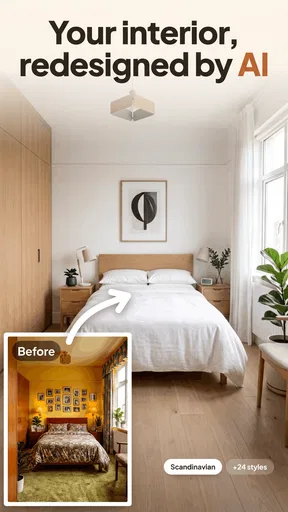
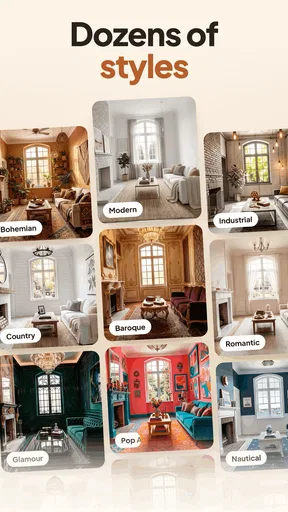
Let’s talk about the standout features. The app uses advanced AI technology to help you redesign any room in your house. You simply snap a picture of your space, and voilà! The app suggests various design options tailored to your style and preferences.
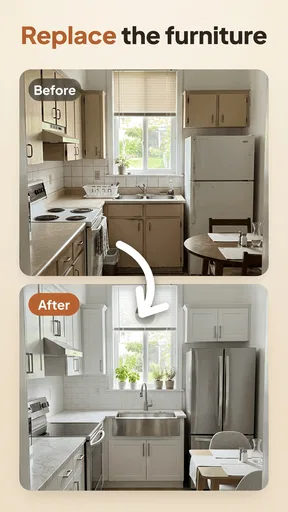
One of my favorite features is the virtual furniture placement. It’s like playing a game of Tetris, but with real furniture! You can test out different layouts and see what fits best before making any commitments. Plus, the app provides a plethora of furniture options to choose from, ranging from modern chic to classic elegance.
Personal Experience
So, how did it fare in my humble abode? I decided to start with my living room. After uploading a picture, the app suggested a Scandinavian theme, which was spot on with my taste. I spent hours experimenting with different layouts and furniture styles. Honestly, it was so much fun, I lost track of time!
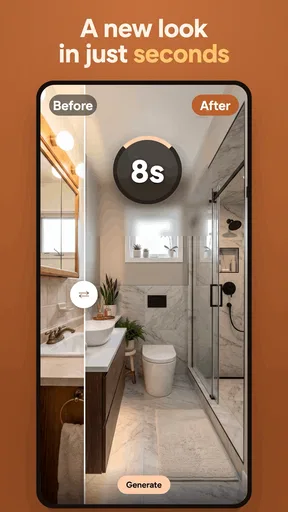
The AI suggestions were impressively accurate, and the ability to visualize the changes in real-time was a game-changer. It’s like having a magic wand to transform your space without the hassle of moving heavy furniture around.
Room for Improvement?
Now, while the app is pretty awesome, no app is perfect, right? I did find myself wishing for a few more customization options. For instance, the color palette selection could be broader, catering to more personalized tastes. Also, while the app is very user-friendly, a few tutorial videos for first-time users wouldn’t hurt.
Final Thoughts
Overall, I found it a handy way to begin thinking about a room refresh, especially when I wanted visual inspiration before committing time or money. It's user-friendly and makes home design feel more like a creative experiment than a chore, though I would still check every practical detail outside the app before acting on an idea.
Whether you're a design enthusiast or someone who just wants to spruce up your living space, this app is worth considering as an early step. It is most useful when you want a fresh visual direction, not when you need precise plans or guaranteed renovation answers. I would use it to discover what I like, then make the real-world decisions carefully.
Pros
- Intuitive interface for easy navigation.
- Vast library of design templates.
- Real-time 3D visualization feature.
- Collaborative tools for team projects.
- Regular updates with new features.
Cons
- Requires high-performance device.
- Some features locked behind paywall.
- Occasional app crashes reported.
- Limited offline functionality.
- Learning curve for advanced tools.
FAQs for AI Redesign - Home Design
What is AI Redesign - Home Design, and how does it work?
AI Redesign - Home Design is a cutting-edge app that leverages artificial intelligence to assist users in redesigning their homes. It utilizes advanced algorithms to provide personalized design suggestions, allowing users to visualize changes in real-time. Whether you're planning a complete makeover or just a minor update, the app offers insights tailored to your preferences and existing space.
Is AI Redesign - Home Design suitable for beginners?
Yes, AI Redesign - Home Design is designed with user-friendliness in mind, making it suitable for both beginners and experienced designers. The intuitive interface guides users through each step, from selecting styles to visualizing the final look. Additionally, the app provides tutorials and tips to help new users get the most out of their design experience.
What are the main features of AI Redesign - Home Design?
AI Redesign - Home Design offers several key features, including AI-driven design recommendations, 3D visualization, and a vast library of furniture and decor options. Users can also customize color schemes, layout designs, and even simulate lighting conditions to see how changes affect their space. The app’s ability to adapt to user feedback makes it a versatile tool for home design.
Are there any costs associated with using AI Redesign - Home Design?
AI Redesign - Home Design offers both free and premium versions. The free version provides basic features and limited access to design tools. For more advanced features, such as an expanded library and enhanced customization options, users can opt for a subscription plan. Pricing details are available within the app and vary depending on the chosen package.
Can I share my designs created in AI Redesign - Home Design with others?
Absolutely! AI Redesign - Home Design allows users to easily share their creations with friends, family, or professional designers. Designs can be exported in various formats and shared via email or social media platforms. This feature is especially useful for receiving feedback or collaborating on projects with others.


